Sign In | Join Free | My ledscreensign.com
China Shenzhen Xinxiantong Technology Co., Ltd. logo
Shenzhen Xinxiantong Technology Co., Ltd.
我们致力于通过持续为全球客户提供创新的产品、可靠的质量和长期的合作价值,成为显示技术领域值得信赖的全球合作伙伴。
Verified Supplier

1 Years

Home > HDMI LCD Display >

1024*600 HDMI LCD Display 7 Inch Raspberry Pi Touch Screen YQX6-7C

Shenzhen Xinxiantong Technology Co., Ltd.
Trust Seal
Verified Supplier
Credit Check
Supplier Assessment
Contact Now

1024*600 HDMI LCD Display 7 Inch Raspberry Pi Touch Screen YQX6-7C

Delivery Time : 30-45days

Outline : 118.5×84.7×5.2 mm

Price : $26.5-30.25/pieces

Supply Ability : 50K/Month

Signal Interface : LVDS

Lumens Degrees : 1000cd/m²

Interface : RGB, SPI, MIPI, LVDS, or Parallel

MOQ : 100

Display Mode : Normally White, Transmissive

View Direction : free/all

Brand Name : XXT

Controller Ic : SSD1316

Storage Temperature : -30℃~80℃

Lcm Dimension : 34.60(H) X 47.80(V) X 1.90(T)

Response Time : 6ms

Display Color : Monochrome Black and White

Model Number : YQX6-7C

Operating_Temperature : -20°C to 70°C

Packaging Details : 164.90 *102.00*14.25mm/510g

Color Gamut : 72 % of NTSC(Typ.)

Place of Origin : Guangdong, China

Drive System : a-Si TFT active matrix

Name : HDMI LCD Display

Payment Terms : T/T

Viewing Area : 116.2mm×87.1mm

Contact Now

YQX6-7C 1024*600 7 Inch HDMI LCD Display , Raspberry Pi Touch Screen
Detail Information
Place of Origin
China
Brand Name
XXT
Certification
CE/ROHS
Model Number
YQX6-7c
Type:
7 Inch HDMI LCD Display
Display Size:
7 Inch
Supplier Type:
Factory
Video Input:
HDMI
Highlight:

7 Inch HDMI LCD Display

,

7 Inch LCD Display HDMI Screen

,

Raspberry Pi Touch Screen

Product Description
YQX6-7C 1024*600 7 Inch IPS HDMI LCD Display with 5-Point Capacitive Touch Screen
Premium Display Features
  • 7-inch IPS display with wide viewing angles and true-to-life color reproduction
  • High resolution 1024*600 display for crisp, detailed visuals
  • Tempered glass touch panel with 6H hardness rating for durability
  • 5-point capacitive touch screen for responsive multi-touch operation
  • HDMI input interface for high-definition video connectivity
  • 3.5mm audio output jack for external sound devices
  • Dedicated backlight adjustment button for brightness control
  • Compatible with Raspberry Pi, Banana Pi, and BeagleBone Black
  • Plug-and-play support for Raspbian, Ubuntu, Kali, and Office software IoT
  • Works as a computer monitor withOffice software/8/10 (touch support)
  • Gaming console compatible with PS4, XBOX360, and Nintendo Switch
  • CE and ROHS certified for quality assurance
Technical Specifications
Size 7.0 inch Screen Type IPS Screen
SKU MPI7006 Resolution 1024*600 dots
Backlight Adjustment Independent button Touch 5 point capacitive
Touch IC GT911 Power MicroUSB (5V/2A)
Dimensions 164.9 * 102 * 14.25 mm Video Input HDMI
Weight 510 g (including packaging) Audio Output 3.5mm Audio Interface
Interface Diagram
1024*600 HDMI LCD Display 7 Inch Raspberry Pi Touch Screen YQX6-7C
Installation Guide
Raspberry Pi Installation
1.
Install 4 copper posts1024*600 HDMI LCD Display 7 Inch Raspberry Pi Touch Screen YQX6-7C
2.
Place Raspberry Pi and install 4 screws (M2.5)1024*600 HDMI LCD Display 7 Inch Raspberry Pi Touch Screen YQX6-7C
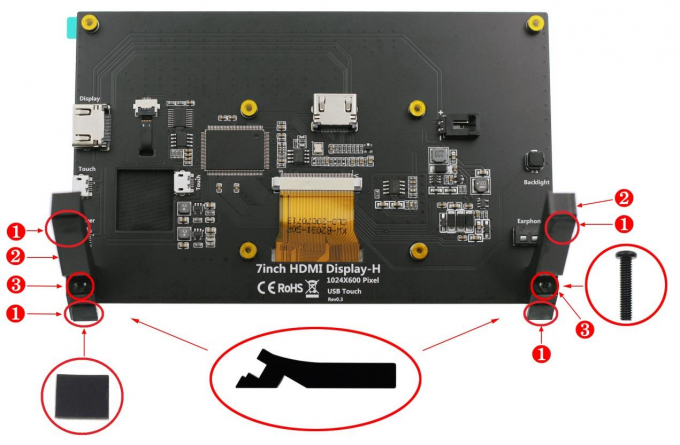
Stand Installation
1024*600 HDMI LCD Display 7 Inch Raspberry Pi Touch Screen YQX6-7C
Connection Guides
Raspberry Pi 4 Connection
1024*600 HDMI LCD Display 7 Inch Raspberry Pi Touch Screen YQX6-7C
Raspberry Pi 3 Connection
1024*600 HDMI LCD Display 7 Inch Raspberry Pi Touch Screen YQX6-7C
Important Note: Always connect cables before powering the Raspberry Pi. Use 2.5A power supply for Raspberry Pi 3B+, 3B, 2B, B+, A models. Use full 3A power supply for Raspberry Pi 4B.
PC/Laptop Connection
1024*600 HDMI LCD Display 7 Inch Raspberry Pi Touch Screen YQX6-7C
System Setup Instructions
1. Download Official Images
  • Raspbian: Download (Username: pi, Password: raspberry)
  • Ubuntu Mate: Download (Set credentials after startup)
  • Kali Linux: Download (Username: kali, Password: kali)
  • Retropie: Download (Username: pi, Password: raspberry)
2. Burn Image to SD Card
1.
Download and install required tools:
  • SD Card Formatter: Download
  • Win32 Disk Imager: Download
2.
Format SD card using SD Card Formatter1024*600 HDMI LCD Display 7 Inch Raspberry Pi Touch Screen YQX6-7C
3.
Burn image using Win32 Disk Imager1024*600 HDMI LCD Display 7 Inch Raspberry Pi Touch Screen YQX6-7C
3. Modify Config.txt File
Add the following to the end of config.txt file:
hdmi_force_edid_audio=1 max_usb_current=1 hdmi_force_hotplug=1 config_hdmi_boost=7 hdmi_group=2 hdmi_mode=87 hdmi_drive=2 display_rotate=0 hdmi_cvt 1024 600 60 6 0 0 0
4. Insert SD Card
1024*600 HDMI LCD Display 7 Inch Raspberry Pi Touch Screen YQX6-7C
5. System Operation
After completing all connections, power on the Raspberry Pi to see display output with full touch functionality.1024*600 HDMI LCD Display 7 Inch Raspberry Pi Touch Screen YQX6-7C

Product Tags:

1024*600 HDMI LCD Display


HDMI LCD Display 7 Inch


7 Inch Raspberry Pi Touch Screen

      
Quality 1024*600 HDMI LCD Display 7 Inch Raspberry Pi Touch Screen YQX6-7C for sale

1024*600 HDMI LCD Display 7 Inch Raspberry Pi Touch Screen YQX6-7C Images

Inquiry Cart 0
Send your message to this supplier
 
*From:
*To: Shenzhen Xinxiantong Technology Co., Ltd.
*Subject:
*Message:
Characters Remaining: (0/3000)